
Working from home or on the go, the right wireless mouse can transform your daily routine. A smooth, comfortable, and reliable mouse makes multitasking easier, reduces hand strain, and keeps your desk clutter-free. If you’re building a productivity setup, here are some of the best options you can find.
Why a Wireless Mouse Matters
- Clutter-free desk – no more tangled cords.
- Freedom of movement – easy to switch between devices or workspaces.
- Ergonomic design – reduces wrist strain for long work sessions.
- Custom shortcuts – extra buttons save time with copy, paste, or switching apps.
Top Wireless Mouse Picks Under $50
1. Logitech G305 Lightspeed

A favorite for its ultra-fast wireless performance and long battery life. Despite being marketed for gaming, it’s an excellent productivity tool thanks to its reliable sensor and responsive clicks.
👉 Check Logitech G305 on Amazon
2. SteelSeries Rival 3 Gen 2 Wireless

This one balances features with affordability. It supports both Bluetooth and 2.4GHz wireless, giving you flexibility if you work across multiple devices.
👉 View SteelSeries Rival 3 on Amazon
3. Logitech M510
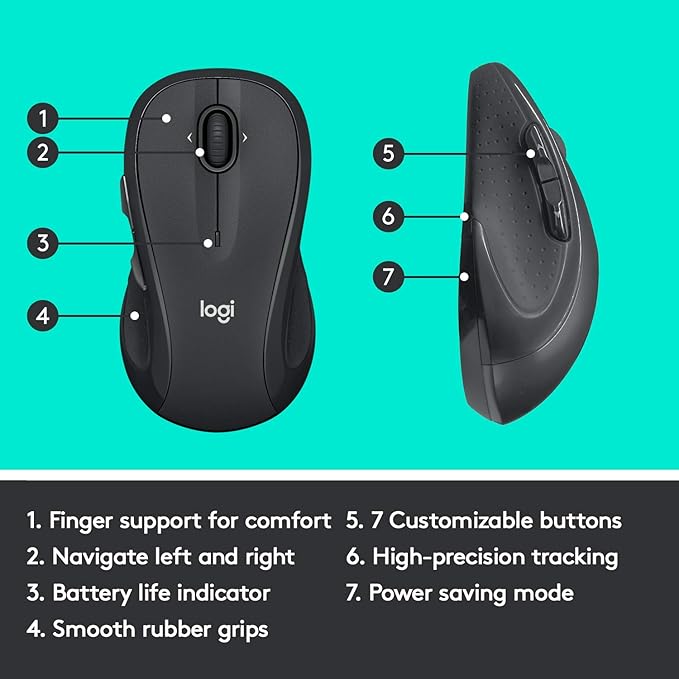
A budget-friendly, comfortable option with extra side buttons for navigating between documents and browsers. Great for all-day office use.
4. TECKNET Wireless Mouse (6-Button Model)

If you’re after value, TECKNET offers quiet clicks, multiple buttons, and solid wireless performance. Perfect if you need a backup or travel mouse.
👉 Find TECKNET Wireless Mouse on Amazon
Choosing the Right Style
- Standard Ambidextrous: Good all-rounders that work for both left- and right-handed users.
- Silent Click: Best for shared offices or quiet environments.
- Ergonomic Vertical: Designed to reduce wrist pressure and prevent fatigue.
- Compact Travel: Lightweight and portable for remote workers on the move.
Tips Before Buying
- Match the mouse size to your hand grip style (palm vs fingertip).
- Consider battery type: rechargeable vs replaceable AA/AAA.
- Multi-device support is a bonus if you work with laptops + tablets.
- Look for programmable buttons to speed up repetitive tasks.
Final Thoughts
Upgrading to the right wireless mouse is a small change with a big impact. Whether you want speed, comfort, or portability, there’s a model that fits your workflow. By reducing strain and eliminating cable clutter, you’ll be free to focus on what really matters—getting more done in less time.
Disclaimer: As an Amazon Associate I earn from qualifying purchases.
Leave a Reply