
As businesses grow, relying on a single VoIP provider can become limiting. Costs may rise, call quality may vary across regions, and redundancy becomes a concern. This is where managing multiple PBX VoIP service providers comes into play. By connecting your PBX to different providers, you can reduce expenses, improve call reliability, and ensure your communications are future-proof.
In this guide, we’ll break down why and how to manage multiple VoIP providers effectively, and what tools and best practices you should follow.
Why Use Multiple PBX VoIP Providers?
1. Cost Optimization
Different providers offer better rates for different regions or call types. By using least-cost routing (LCR), you can automatically send calls through the provider with the lowest rates for each destination.
2. Redundancy & Failover
No provider is perfect. Outages happen. By integrating multiple providers, you can configure your PBX to failover automatically, so your business never loses communication during downtime.
3. Global Reach
Some providers excel in certain geographies. If you have international clients, connecting with multiple carriers ensures better coverage and lower latency.
4. Scalability & Flexibility
With multiple providers, you can add new numbers, extensions, or call routes without depending on one vendor’s capacity or policies.
Key Components in Managing Multiple Providers
🔹 1. PBX System (The Core)
- Your PBX (Asterisk, FreePBX, 3CX, FusionPBX, or cloud-hosted platforms) must support multiple SIP trunks.
- Each SIP trunk represents a connection to a VoIP provider.
- Dial plans allow you to control which provider is used for each type of call.
🔹 2. Session Border Controller (SBC)
- An SBC is a security and routing layer between your PBX and VoIP providers.
- It:
- Manages SIP traffic
- Protects against attacks
- Handles NAT traversal
- Provides intelligent call routing and failover
Examples: Kamailio (open-source), AudioCodes, Oracle SBC.
🔹 3. Intelligent Routing
- Least-Cost Routing (LCR): Always pick the cheapest provider for a given destination.
- Failover Routing: Automatically reroute to another provider if the primary one fails.
- Many PBX systems and SBCs have this feature built-in.
🔹 4. Monitoring & Analytics
- Monitor call quality: MOS, jitter, packet loss, latency.
- Track uptime and provider performance.
- Keep cost analysis by provider to ensure you’re maximizing savings.
Tools: VoIPmonitor, Grafana dashboards, PBX logs.
Best Practices for Multi-Provider Management
✅ 1. Separate Providers by Function
- Provider A: Local/national calls
- Provider B: International calls
- Provider C: Backup/emergency routing
This reduces dependency and optimizes costs.
✅ 2. Maintain a Centralized Management Policy
- Document SIP credentials, routing rules, and failover policies.
- Use role-based access so only admins can change trunk settings.
✅ 3. Security First
- Use unique SIP credentials per provider.
- Enable TLS/SRTP for encryption.
- Set up firewalls & IP whitelisting to block unauthorized access.
✅ 4. Test Failover Regularly
- Don’t wait for an outage to discover issues.
- Run routine failover drills to ensure calls reroute as expected.
✅ 5. Unify Billing & Reporting
- Maintain a billing tracker to compare monthly provider costs.
- Some aggregators (Twilio, Bandwidth, Plivo) act as “one-stop shops” while still leveraging multiple underlying carriers.
Example Setup
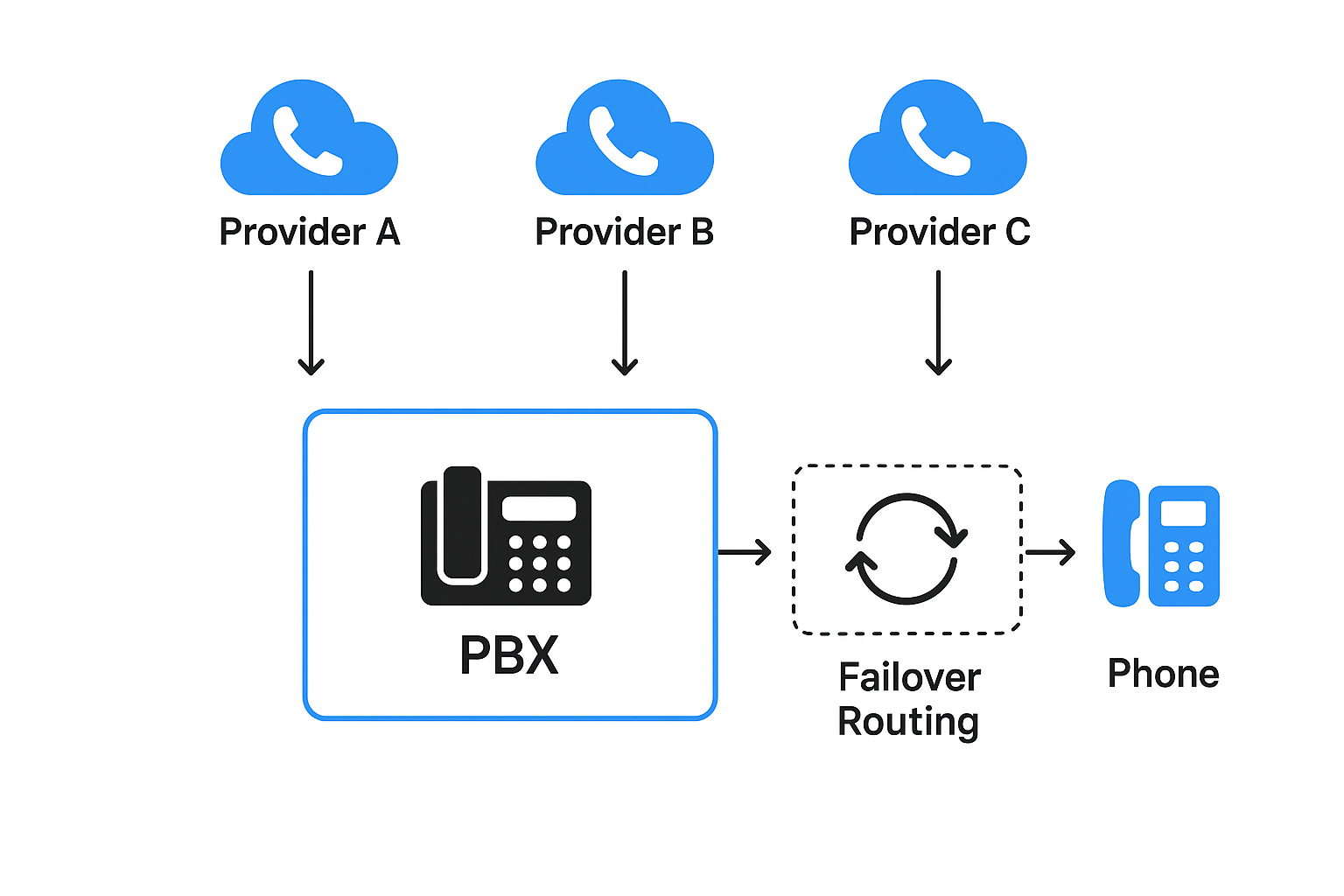
how multiple providers connect to a PBX with failover routing
Scenario: A mid-sized company serving both domestic and international clients.
- PBX: FreePBX
- Trunks:
- Provider A → Domestic calls (cheapest rates in-country)
- Provider B → International calls (competitive global coverage)
- Provider C → Backup provider (used when A or B fails)
Routing Rules:
- Domestic → A
- International → B
- Failover → C if A/B unavailable
Monitoring: VoIPmonitor alerts IT staff if call quality drops or if a trunk is down.
Result: Lower bills, improved reliability, and guaranteed uptime.
When to Consider a Multi-Provider Setup
- Your business makes a high volume of calls to different countries.
- You’ve experienced downtime from a single provider in the past.
- You need flexibility to switch carriers without disrupting your PBX setup.
- You want to control costs with least-cost routing.
| PBX Platform | Open Source / Commercial | Multi-Provider Support | Key Strengths | Best For |
|---|---|---|---|---|
| FreePBX (Asterisk-based) | Open Source (with paid add-ons) | ✅ Yes (multiple SIP trunks, advanced dial plans) | Highly customizable, large community, flexible routing | SMBs & IT teams comfortable with DIY setups |
| 3CX | Commercial (with free version available) | ✅ Yes (supports multiple trunks, LCR) | Easy to use, good UI, built-in web conferencing | Businesses wanting a polished commercial product |
| FusionPBX (FreeSWITCH-based) | Open Source | ✅ Yes (multi-tenant, scalable) | Handles multi-tenancy, advanced routing, robust performance | Hosting providers, MSPs, large organizations |
| Issabel (Asterisk fork) | Open Source | ✅ Yes (similar to FreePBX) | Includes call center modules, CRM integrations | Businesses needing call center + VoIP in one |
| Cloud PBX (RingCentral, 8×8, Vonage, etc.) | Commercial (SaaS) | ⚠️ Limited (usually tied to one provider) | Easy setup, minimal maintenance, support included | Small businesses wanting simplicity over flexibility |
📌 Takeaway:
- If you want full control and flexibility → FreePBX or FusionPBX are the best bets.
- If you want a user-friendly commercial option → 3CX works well.
- If you want low-maintenance SaaS but can live without multi-provider flexibility → Cloud PBX may be enough.
Final Thoughts
Managing multiple PBX VoIP service providers isn’t just for large enterprises—it’s becoming essential for SMBs as well. With the right PBX platform, an SBC for security, intelligent routing, and strong monitoring practices, businesses can ensure reliable, cost-effective, and scalable communications.
Instead of being tied to one vendor’s limitations, you gain the freedom to choose the best provider for every scenario—reducing costs and boosting reliability.
Leave a Reply